
Time Blocking vs To-Do List: Which Works, and How to Combine Them
Table of Contents
It is Tuesday, 9.05am. Your to-do list has 23 items, and the one that matters — the proposal due Friday — sits at number 14. By 6pm you have ticked off 11 things. The proposal has not moved.
So you try the other camp. You color-code tomorrow into neat 30-minute blocks. At 10.12am your manager drops a “quick sync” into your calendar, the 11am block slips into lunch and by 2pm the plan is fiction.
That is the time blocking vs to-do list debate in two days. Both methods fail when you ask them to do the other one’s job. A list holds everything but never says when. The calendar protects time but cannot hold 23 things.
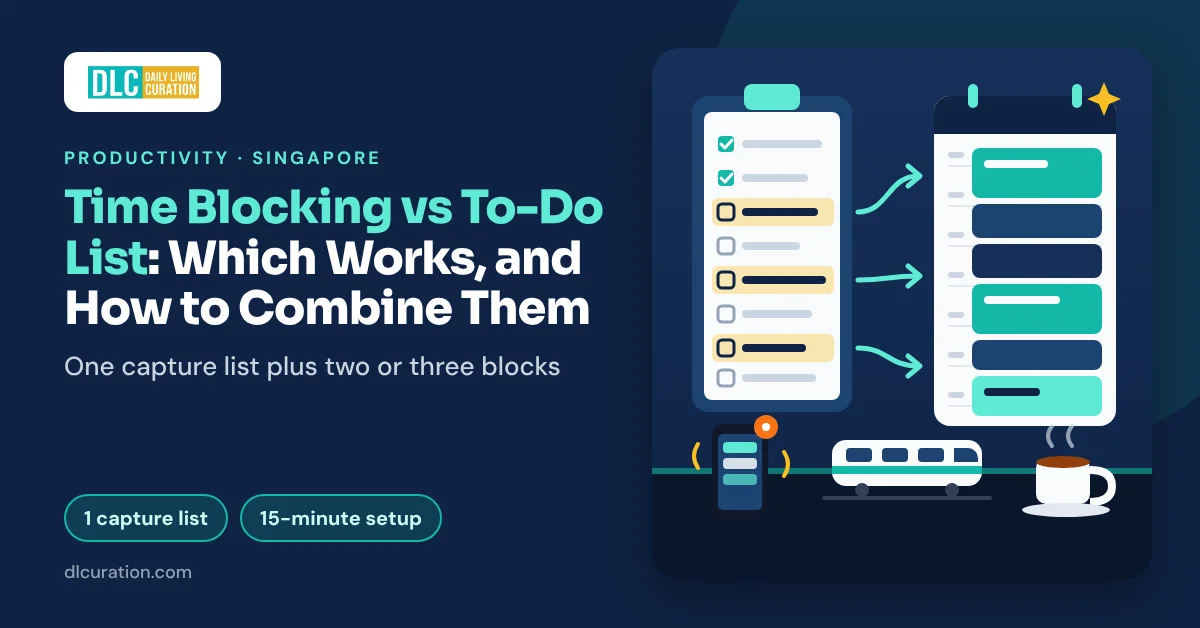
The fix is a hybrid: one capture list for everything, plus calendar blocks for the two or three tasks that matter today. It takes about 15 minutes to set up and 10 minutes a day to run.
This guide matches each method to a kind of day — meeting-heavy office jobs, maker work, shift work and parents. Then it walks through the hybrid system step by step, with Singapore’s 9-to-6, lunch at 12 and the WhatsApp pings built in.
Why Most People Pick the Wrong Planning Tool
Most people pick a planning method because a friend swore by it. The real question is not which method is better. It is how much of your day you control.
A to-do list assumes you will find the time. That works when your day is open. It fails when the day is full, because the list never says when. In my experience, unscheduled tasks lose to scheduled ones, and the big task loses to the small ones you can finish before the next meeting.
A time-blocked calendar assumes your day will go to plan. That works when you control most of your hours. It fails when other people control them, because one surprise meeting breaks the chain of blocks behind it.
The research points the same way. Psychologists Peter Gollwitzer and Paschal Sheeran pooled 94 independent tests of “implementation intentions” — plans that say when, where and how you will act. Those plans had a medium-to-large effect on reaching goals (d = 0.65). A time block is an implementation intention written into your calendar. On its own, a list item is not one.
But you cannot write a when-and-where plan for 23 tasks. Nobody’s day has room.
The core principle: let the list hold everything, and let the calendar protect only the few tasks that matter.
Time Blocking vs To-Do List: What Each One Does Well
Here is the short comparison before we get to your type of day.
| To-do list | Time blocking | |
|---|---|---|
| What it answers | What needs doing? | When will I do it? |
| Best at | Capturing everything, small tasks, errands | Deep work, deadlines, tasks you keep avoiding |
| Breaks when | The day is packed and you skip the big tasks | Meetings and pings move without warning |
| Daily effort | Low — add and tick | Medium — 10 minutes of planning, plus rebuilding when plans change |
| Risk | Busy all day, nothing important done | A plan so rigid you abandon it by lunch |
| Works best for | Open days, short tasks, reactive roles | Maker work, protected focus hours |
The two columns are not rivals. Think of the list as your inbox for commitments and the calendar as your budget for hours. You need both, in different amounts.
Which One Fits Your Kind of Day
Pick the description closest to your week. Most people are a mix.
Meeting-Heavy Office Job: Mostly List, Two Defensive Blocks
If your calendar fills before you open it, full time blocking will frustrate you.
Microsoft’s 2025 Work Trend Index report on the “infinite workday” shows why. Its Microsoft 365 data found the average employee interrupted every two minutes during core hours by meetings, emails or chats. Half of all meetings fell between 9am and 11am or between 1pm and 3pm. The data is global, not Singapore-only, but it matches what most 9-to-6 office days feel like.
So run your day from the to-do list, and add two defensive blocks:
- One focus block of 60–90 minutes in a gap the meetings tend to miss. In a typical Singapore office that is 8–9.30am on days you come in early, before the morning meeting wave builds, or 3–4.30pm once the early-afternoon wave has passed.
- One 30-minute admin block before 6pm to clear the small items the meetings created.
Lunch at 12–1 helps. Most colleagues respect it, so an 11am–12pm block has a hard stop.
Maker Work: Mostly Blocks, a Short List on the Side
Designers, writers, engineers and analysts should time block. Your output depends on unbroken hours, and a list never protects those.
Book two blocks of 90 minutes on most days, in your peak hours. Put admin, email and small tasks into one or two short slots and keep them on the list. To find your peak hours, use the energy audit in my guide to building a daily schedule.
If 90 minutes feels too long at first, split each block into Pomodoro sprints of 25 minutes with five-minute breaks.
Shift Work: Block by Roster, List by Context
Shift workers in healthcare, security, F&B, aviation and retail cannot time block the way office guides describe. Under the Employment Act, MOM allows shifts of up to 12 hours a day. On a 12-hour shift day, the shift is the only block that exists.
Plan by roster cycle instead of by day:
- On shift days, use the list only. Keep it short and sorted by context — “on break”, “on the commute home”, “phone calls”.
- On off days, block one or two personal priorities. Book them the day your roster comes out.
- Never block anything important straight after a night shift. Put recovery on the calendar instead.
Parents: Short Blocks on Fixed Anchors, a List Sorted by Time
Young children ignore your calendar. A two-hour block at home will break, and the guilt makes the next day harder.
Anchor short blocks of 25–45 minutes to the few fixed points in your day: after school drop-off, during nap time, after the kids’ bedtime. Then sort your list by how long each task takes — “five minutes”, “15 minutes”, “needs an hour”. When a gap opens up, you pick from the right bucket instead of deciding from scratch.
For the hour-long tasks, block them on the days another adult is on duty.
Hybrid Office Days: Different Plans for Different Days
Since 1 December 2024, MOM’s Tripartite Guidelines on Flexible Work Arrangement Requests have required employers to consider formal requests and reply within two months. Approval is not automatic.
If your week is hybrid, plan each type of day differently:
- Home days are block days. Put your focus blocks there, when nobody can pull you into a “quick chat”.
- Office days are list days. Plan for meetings, conversations and small tasks. Do not book deep work on a day you will spend at a hot desk.
- The MRT commute is a list slot. Triage the list or clear small replies there. My guide to a productive commute shows how to split the ride.
The Three Tools You Need
You need one calendar and one list. A fancy app does not fix a vague plan.
- A calendar app (free) — Google Calendar is free with any Google account. Outlook has a free calendar too, and most Singapore offices already give you a work Outlook account. Use the one your colleagues book meetings in.
- A task app (free, or about US$4–5 a month) — TickTick has a basic calendar view on the free plan, and Premium costs US$49.99 a year. Todoist’s calendar integration connects to Google Calendar or Outlook on every plan, including the free one. Give a task a date, time and duration, and it appears as an event. Todoist Pro is US$5 a month billed yearly, or US$7 month to month, and adds an in-app calendar layout.
- Paper (S$0) — A notebook page with the list on the left and the hours of the day on the right. Cal Newport’s The Time-Block Planner is a printed version of this layout. The second edition is spiral-bound with four months of daily pages. Check local bookshops for the Singapore price.
Total cost: S$0 with the free plans or paper.
Budget alternative: The calendar you already have for work, plus the notes app on your phone as the list.
The Hybrid System: How to Time Block Your Day Without Ditching the List
Set aside 15 minutes for the setup. After that, the system takes about 10 minutes a day.
Step 1 — Build One Capture List (15 Minutes, Once)
Your capture list is the single place every task goes. Emails that need a real reply, promises made in meetings, tasks hidden in WhatsApp groups, life admin — all of it.
- Pick one tool for the list. Not two.
- Empty your head and your inboxes into it, including sticky notes and chat messages.
- Make adding a task take under 10 seconds: a home-screen widget, a keyboard shortcut or a pen on your desk.
From now on, if a task arrives anywhere else, move it to the list within the minute. My guide to WhatsApp group chat overload covers getting tasks out of chats.
What you end up with: One trusted list. Expect 30–50 items on day one.
Time saved vs manual: You stop scrolling three apps to remember what you promised.
Step 2 — Pick Your Two or Three Block-Worthy Tasks (5 Minutes, Daily)
Each morning, pick the two or three tasks that deserve a block. A task is block-worthy if it passes one of three tests:
- It takes more than 30 minutes of focus.
- It moves an important goal, not someone else’s urgent request.
- You have postponed it at least twice.
Everything else stays on the list. If you struggle to tell important from urgent, sort the list with the Eisenhower Matrix first. Its “schedule” quadrant is your block-worthy pile.
What you end up with: A short shortlist, not a second to-do list.
Time saved vs manual: You make the hard choice once, calmly, instead of all day under pressure.
Step 3 — Block Them Around the Fixed Points (5 Minutes)
Open your calendar and book the shortlist into the gaps between fixed commitments. Singapore office days have three helpful fixed points:
- Start and end of day. For a 9-to-6 job, the first hour and the last 90 minutes are often the quietest.
- Lunch at 12–1. A block that ends at noon has a hard stop built in.
- Your commute. It frames the day. Do not plan focus work on the train, but do plan list triage there.
Write each block as a first action — “Draft section two of the proposal”, not “Proposal” — and mark it as busy.
What you end up with: Two or three named blocks in your calendar, defended like meetings.
Time saved vs manual: The important work has a time. It no longer waits for a gap that never comes.
Step 4 — Pad Every Block for the Planning Fallacy (2 Minutes)
You will underestimate how long your blocks need. Everyone does.
In a classic 1994 study, Roger Buehler, Dale Griffin and Michael Ross asked 37 psychology students to predict when they would finish their honors theses. The students predicted 33.9 days on average and took 55.5. Fewer than a third finished by their own best guess. Their worst-case guesses (48.6 days) were too optimistic as well.
So add a buffer. My rule: book 1.5 times what you think the task needs, and leave one 30-minute slot a day unbooked for overruns.
What you end up with: Blocks that survive contact with a real day.
Time saved vs manual: You stop rebuilding the whole calendar every time one task runs long.
Step 5 — Work the List in the Gaps, and Batch the Pings (All Day)
Between blocks, work from the list. Pick the next item by the time you have: a 15-minute gap gets a 15-minute task.
Treat messages the same way. Check WhatsApp, Teams or Slack at set times — on the hour, or between blocks — not every time your phone buzzes. Turn notifications off during each block.
When a meeting lands on a block, move the block to the next open slot instead of deleting it.
What you end up with: Small tasks done in the gaps, big tasks done in the blocks.
Time saved vs manual: You stop paying the switching cost of answering every ping the moment it arrives.
Step 6 — Close the Loops Before You Leave (5 Minutes)
Unfinished tasks nag at you — the old idea often called the Zeigarnik effect. E.J. Masicampo and Roy Baumeister tested what quiets that nagging. In a 2011 series of experiments, unfinished goals caused intrusive thoughts and hurt performance on unrelated tasks. Letting people make a specific plan for those goals removed the effect. The task was still undone. The plan was enough.
So spend the last five minutes of your workday on three moves:
- Tick off what you finished.
- For each block that slipped, book a new slot.
- Pick tomorrow’s first block.
Then close the laptop. MOM’s Tripartite Advisory on Mental Health and Well-being at Workplaces suggests a position employers can adopt. Under it, after-hours messages need no response until the next working day, unless someone marks them “Urgent”. It is guidance, not law. Still, 55% of full-time resident employees said in 2025 that their employer had an after-hours communication policy, up from 48% in 2022. If yours does, a 9pm ping goes on tomorrow’s list, not tonight’s.
What you end up with: A clear head at 6pm and a first task waiting at 9am.
Time saved vs manual: No Monday-morning hunt for where you left off.
Step 7 — Re-plan the Week Once (Part of Your Weekly Review)
Once a week, scan the whole list, delete what no longer matters and pencil in next week’s block-worthy tasks. If you already do a weekly review, add this to its planning step. It takes about 10 extra minutes.
What you end up with: A list that stays trusted and a week with its big tasks already placed.
Time saved vs manual: You stop re-reading a 60-item list every morning.
The Full Time Breakdown
| Step | Task | List only, or blocks only | Hybrid system |
|---|---|---|---|
| 1 | Capture tasks | Spread across chats, email and memory | One list, once: 15 minutes |
| 2 | Choose what matters | Decided all day, under pressure | 5 minutes each morning |
| 3 | Find time for it | Waits for a gap, or a fully blocked day | 5 minutes, two or three blocks |
| 4 | Plan for overruns | None — the whole plan collapses | 2 minutes of padding |
| 5 | Small tasks and pings | Answered the moment they arrive | Worked in the gaps, checked at set times |
| 6 | End the day | Tasks rattling around your head at night | 5 minutes to close the loops |
| 7 | Plan the week | Monday scramble | About 10 minutes in the weekly review |
| Total | Planning time | Scattered, or 30 minutes of rebuilding | 15 minutes once, then about 10 minutes a day |
What Time Blocking Cannot Do (And Should Not Try To)
It cannot fix a job with no free hours. If meetings fill 9-to-6 every day, no block survives. That is a workload conversation. Take your calendar to your manager and ask which meetings you can skip.
It does not suit fully reactive roles. Customer support and front-desk work run on whatever arrives. A priority-sorted list beats a detailed calendar there.
It does not choose your priorities for you. Blocking the wrong task protects the wrong task. Step 2 matters more than Step 3.
The evidence is broad, not specific. I could not find a controlled study that tested time blocking against a to-do list directly. The evidence covers planning in general. A 2021 meta-analysis of 158 studies with 53,957 participants found time management moderately linked to job performance and slightly more strongly to well-being. Treat the hybrid as a sensible system, not a proven formula.
Tips to Get More From Time Blocking
Cap yourself at three blocks a day. More than that and one broken block breaks the rest.
Protect one block from your afternoon dip. Book creative work in the morning and admin in the early afternoon. My guide to beating the afternoon slump shows how to find your low point.
Make the block visible. Set it as “Busy” with a short label and turn on Do Not Disturb. Colleagues book over blank space, not named blocks.
Start the block in the first two minutes. The hardest part of a block is the opening. If you stall, the two-minute starts in my guide on how to stop procrastinating help.
The Budget Version of This Workflow
The whole system runs free:
- Use your work calendar for blocks. Google Calendar and Outlook both cost nothing.
- Use your phone’s notes app or a free task app plan for the capture list.
- Or go fully paper: an A5 notebook, with the list on the left page and the day’s hours down the right.
The trade-off: paper does not remind you or show your blocks to colleagues. Copy your focus blocks into the shared work calendar too, so nobody books over them.
If you want to compare more task apps first, my productivity apps ranking covers the main free options.
Frequently Asked Questions
Is time blocking better than a to-do list?
Neither wins on its own. Time blocking works best for long, focused tasks when you control your hours. A to-do list works best for capturing everything and handling small tasks. Most people get the best results from a list for everything, plus blocks for two or three priority tasks a day.
How do I time block when my day is full of meetings?
Do not try to block the whole day. Find the one gap meetings tend to miss, often the first hour or the last 90 minutes. Book a single focus block there and mark it as busy. Run the rest of the day from your list, and move the block to the next open slot if a meeting takes it.
How many hours should I time block each day?
Two to three hours of focus blocks is a sensible ceiling for most office jobs, spread across two or three blocks. Maker roles with few meetings can block more. Always leave at least one 30-minute slot unbooked so overruns have somewhere to go.
What should I do when a time block gets interrupted?
Move it, do not delete it. Rebook the block for the next open slot that day or first thing tomorrow, then return to the list for whatever time is left. A plan that moves still counts as a plan.
Can I use time blocking with the Pomodoro Technique?
Yes, and they fit well together. Time blocking decides when you work on a task. Pomodoro decides how you pace the work inside that block, with 25-minute sprints and short breaks. A 90-minute block holds three Pomodoros with breaks.
Does time blocking work for shift workers?
It works, but plan by roster cycle instead of by day. Use only a short to-do list on long shift days. On off days, block one or two personal priorities the moment your roster comes out, and never block demanding work straight after a night shift.
Final Thoughts
The time blocking vs to-do list question has a plain answer: use both, for different jobs. The list holds everything, so nothing slips. The calendar protects the two or three tasks that matter, so they stop sliding to tomorrow.
Setup takes 15 minutes. After that, about 10 minutes a day buys a fixed time for your most important work. If your blocks protect two hours a day, a working year of around 250 days gives you roughly 500 hours of focused work on what you care about.
Start tomorrow. Tonight, move every stray task into one list, pick the single most important one and book it into your calendar for tomorrow morning.
→ Open Google Calendar and book tomorrow’s first block
→ Try TickTick’s free plan for your capture list
→ Try Todoist free and sync tasks to your calendar
Are you a list person, a calendar person or somewhere in between? Tell me what your day looks like in the comments.
Continue reading: