5 AI Tools That Saved Me 3 Hours a Day: My Honest Daily Workflow (2026)
Table of Contents
Six months ago, a typical content day ran like this.
Morning emails: 45 minutes. Client meeting notes and follow-up tasks: 30 minutes. Blog post research: 40 minutes. First draft: 90 minutes. Design work for social posts: 45 minutes. Miscellaneous admin — invoicing, scheduling, file organisation: 40 minutes.
Total: just over six hours. For work that generated maybe two hours of actual output.
The problem was not effort. It was that most of those hours were going into the scaffolding around the work — the note-taking, the formatting, the searching, the switching between tools. The thinking itself — the parts that require judgement, creativity, and expertise — was a fraction of the day. Everything else was mechanical overhead.
These five tools cut that overhead by roughly three hours every day. Not by doing the thinking for me. By handling the mechanical parts so the thinking is all that is left.
I have been running this stack for six months. Here is the exact breakdown — tool by tool, time saved, what each one replaced, and the honest verdict on whether it is worth the cost.
Why Most People Pick the Wrong AI Tools
Before the tools, one principle worth stating clearly.
Most people approach AI tools the wrong way. They look for the most powerful tool, the one with the longest feature list, the one with the best marketing. What they should be looking for is the specific bottleneck in their own day — and the tool that eliminates exactly that.
Three hours saved per day does not come from one tool doing everything. It comes from five tools, each eliminating 30–45 minutes of overhead in a specific category. The compound effect of those small wins is where the real productivity shift happens.
Identify your mechanical overhead first. Then pick the tool that removes it. That is the principle behind every choice below.
The Five Tools — Overview
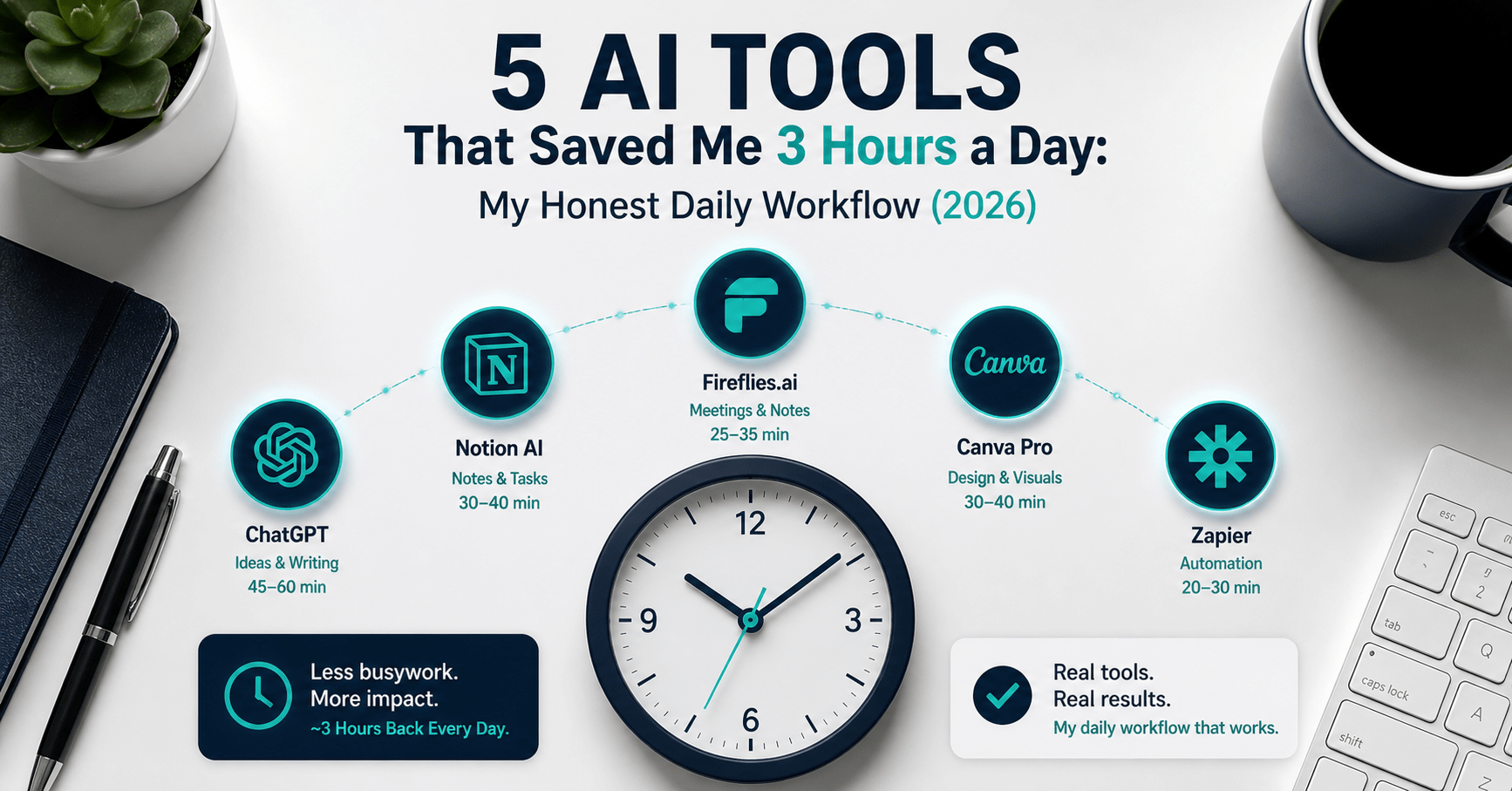
| Tool | Category | Time saved/day | Monthly cost | Free plan |
|---|---|---|---|---|
| ChatGPT Plus | AI thinking partner | 45–60 min | $20 | Yes (limited) |
| Notion AI | Knowledge and task management | 30–40 min | $10 (Plus) | Yes |
| Fireflies.ai | Meeting capture | 25–35 min | $10 (annual) | Yes |
| Canva Pro | Visual content creation | 30–40 min | $12.99 | Yes |
| Zapier | Workflow automation | 20–30 min | $19.99 | Yes (100 tasks) |
| Total | ~3 hours/day | ~$73/month |
Tool 1 — ChatGPT Plus: The Thinking Partner That Never Clocks Off
Time saved per day: 45–60 minutes
What it replaced: Staring at blank documents. Slow email drafts. Manual research on topics I half-know but need to verify. The internal monologue of “how should I structure this?” that used to eat 20 minutes before a single sentence was written.
Before ChatGPT Plus was a daily habit, the start of every content task involved a friction period — deciding on structure, working out an angle, figuring out what I already knew and what I needed to look up. That period was silent, invisible, and expensive. It averaged 20–25 minutes per task before anything was actually produced.
Now that friction period is almost gone. I describe the task, share the context, and get a starting framework in 30 seconds. I still write everything myself. I still make every editorial decision. But I am starting from a structured scaffold rather than an empty page.
The specific daily uses that save the most time:
Email drafts. I describe what I need to communicate — the context, the tone, the outcome I want — and ChatGPT drafts it. I edit for about 90 seconds. What used to take 15 minutes now takes three.
Research orientation. Before diving into a new topic, I ask ChatGPT to map the landscape: what are the main considerations, what do most people get wrong, what should I look into specifically? It compresses 30 minutes of exploratory reading into a five-minute briefing I then verify and expand.
Structural thinking. “Here is what I am trying to accomplish. What am I missing?” That question alone — run on a first draft, a business decision, or a client proposal — consistently surfaces gaps I would have spent hours not noticing.
What ChatGPT cannot do: It cannot replace judgement, genuine expertise, or current information (the free version especially). I fact-check every specific claim. I verify every price and statistic. The output is a scaffold — the expertise that fills it is mine.
Pricing:
- Free: GPT-3.5, limited access
- Plus: $20/month (GPT-4o, faster responses, file uploads)
- Team: $25/user/month
Bottom line: The $20/month is the easiest ROI calculation in this stack. If it saves 45 minutes daily at any reasonable hourly rate, it pays for itself inside a single working day each month. Start here before adding anything else.
→ Try ChatGPT free or upgrade to Plus
Tool 2 — Notion AI: The System That Holds Everything Together
Time saved per day: 30–40 minutes
What it replaced: Scattered notes across three apps. Digging through email threads to find what was decided in a meeting two weeks ago. Manually rebuilding context every time I returned to a project after a few days away.
Information loss is a hidden time cost that most people do not measure. Every time you have to reconstruct context — re-reading notes, searching emails, trying to remember where you put that research — you are spending minutes that add up to tens of hours per month. Notion AI eliminates most of that.
The workspace functions as the operating system of the business. Every client project, content plan, article draft, research note, financial record, and process document lives in one place — structured, searchable, and queryable with natural language.
The AI layer is what makes it genuinely different from a notes app. Ask it a question about your own workspace — “What did I decide about pricing for the Singapore client?” or “Which articles are still in draft status?” — and it searches and surfaces the answer in seconds. The alternative is manual searching, which takes minutes and often returns incomplete results.
The daily uses that save the most time:
Meeting notes to action items. I paste raw meeting notes into Notion AI and ask it to extract action items, decisions, and follow-up questions. What used to take 15 minutes of manual structuring takes 90 seconds.
Weekly planning. Notion AI reviews my task database and project notes, then generates a draft weekly plan with priorities ordered by deadline and importance. I adjust it in about five minutes. Without it, weekly planning took 25–30 minutes.
Content calendar management. Tracking 10 articles in various stages — researched, drafted, edited, scheduled — without a system means constant mental overhead. Notion’s database views make status visible at a glance.
What Notion AI cannot do: It cannot think strategically for you. The quality of what it surfaces is entirely dependent on the quality of what you put in. Garbage notes produce garbage summaries. The tool rewards disciplined input.
Pricing:
- Free: Unlimited pages for individuals, limited AI responses
- Plus: $10/month (billed annually) — unlimited file uploads, version history
- Business: $20/month — full Notion AI, Google Drive and Slack integration
Bottom line: The free plan is genuinely useful for individuals. The Plus plan at $10/month is worth it once your workspace has grown beyond basic notes — the unlimited file uploads and version history alone justify it.
→ Get started with Notion for free
Tool 3 — Fireflies.ai: Never Take Meeting Notes Again
Time saved per day: 25–35 minutes
What it replaced: Manual note-taking during calls. The 15–20 minutes spent after every meeting writing up what was discussed, what was decided, and what needed to happen next. The anxiety of wondering if I had captured everything accurately.
This is the tool with the most dramatic before-and-after in my workflow. Before Fireflies, every client call required split attention — one part engaged in the conversation, one part typing notes. The notes were always incomplete. The follow-up write-up always took longer than expected.
Fireflies joins every Zoom, Google Meet, or Microsoft Teams call automatically. It records, transcribes, and delivers a structured summary — decisions, action items, key points — directly to my inbox within minutes of the call ending.
The transcript accuracy runs at around 95% in clear audio conditions. The summary is not perfect — it occasionally misattributes a point or misses a nuanced decision — but it is a far better starting point than anything I produced while simultaneously trying to run a meeting.
The specific daily uses that matter most:
Client calls. I stop taking notes entirely during the call. Full attention on the conversation, on listening, on asking the right follow-up questions. The transcript handles capture. After the call, I spend five minutes reviewing Fireflies’ summary and adding any context it missed.
Action item extraction. Fireflies’ AI identifies action items from the transcript and presents them as a checklist. I paste them directly into Notion. The entire post-meeting workflow — notes, actions, follow-up email — now takes under 10 minutes instead of 30–45.
Searchable call library. Every call is searchable. Six months in, I can find what was decided on any client project in under a minute. Without Fireflies, that would mean scrolling through handwritten notes or admitting I cannot find it.
The honest limitation: The AI credit system is genuinely frustrating. Features like AskFred (the AI assistant for querying transcripts) and advanced summaries consume monthly credits that are capped even on paid plans. Heavy users of these features exhaust their credit allocation faster than expected. For basic transcription and summaries, the free plan is adequate. For daily heavy use, the Pro plan at $10/month (billed annually) removes most friction.
Pricing:
- Free: 800 minutes storage, basic transcription
- Pro: $10/month (billed annually) / $18/month — unlimited transcription
- Business: $19/month (billed annually) — video recording, conversation intelligence
Bottom line: The first call you run without taking notes is the moment this tool justifies itself. The time saving is immediate and measurable. Start on the free plan and upgrade once the 800-minute storage limit becomes a constraint.
→ Start using Fireflies.ai for free
Tool 4 — Canva Pro: Professional Visuals in 15 Minutes or Less
→ Try Canva Pro free for 30 days
Time saved per day: 30–40 minutes
What it replaced: Outsourcing design to a freelancer for non-urgent pieces. Struggling with Photoshop for 45 minutes to produce something I was never happy with. The delay between deciding I needed a visual and having one ready to publish.
Design work has a particular productivity cost for non-designers: it takes longer than expected, the output is often mediocre, and the mental effort is disproportionate to the result. A 45-minute struggle to produce a passable blog thumbnail is not a good use of anyone’s time.
Canva Pro eliminates that struggle almost entirely.
The AI features that save the most time in daily use:
Magic Resize. Create one social graphic and resize it for every platform — LinkedIn, Instagram Stories, Twitter header, email banner — in a single click. What used to require rebuilding the design for each format now takes 30 seconds.
Background Remover. Remove the background from any product photo or image instantly. The task that used to require Photoshop or a freelancer now takes one click and five seconds.
Brand Kit. Upload your logo, set your colours and fonts once, and every design you produce automatically uses the correct brand assets. No more hunting for the right hex code or font name. No more off-brand graphics because someone used the wrong shade of navy.
Magic Design. Describe what you need — “a blog header for an article about AI productivity tools, clean and minimal, navy and teal” — and Canva generates three to five layout options as starting points. Even when none of them is exactly right, they cut the blank-canvas problem and reduce design time by 60%.
The honest limitation: Canva is not for complex, highly customised design work. If you need bespoke illustration, intricate typography, or print-ready collateral with precise specifications, a professional designer is still the right answer. For the volume of standard digital content a solo creator produces — social posts, blog images, email headers, simple presentations — Canva Pro handles it completely.
Pricing:
- Free: Core editor, limited templates, 5GB storage
- Pro: $12.99/month (or $119.99/year — saving 23%)
- Teams: $14.99/month per user (up to five users)
Bottom line: The free plan covers basic needs. The Pro plan at $12.99/month earns its keep if you produce visual content more than three to four times per week — the Brand Kit and Magic Resize alone justify the cost.
→ Start your 30-day Canva Pro free trial
Tool 5 — Zapier: The Invisible Layer That Connects Everything
Time saved per day: 20–30 minutes
What it replaced: Manual copy-paste between apps. Remembering to add a new lead to the CRM after they emailed. Manually creating a Notion task when someone booked a call. Updating a spreadsheet after an invoice was paid.
Zapier does not save time in dramatic, visible ways. It saves it in invisible ones — the 30 seconds here, the two minutes there, the task you forgot to do manually and spent 20 minutes reconstructing. Those fragments add up to 20–30 minutes daily across a content and client workflow.
The concept is simple: when something happens in one app, Zapier automatically does something in another app. New lead in Typeform → added to ConvertKit mailing list → Notion task created → confirmation email sent. That sequence, which would take four manual steps across four apps, happens in the background without a single click.
The three Zaps that save the most time in my specific workflow:
Content publishing notification. When a new post goes live on WordPress, Zapier automatically creates a “promote this article” task in Notion with the article title, URL, and a checklist of promotion steps. Without this, I would occasionally forget the post-publish promotion routine or have to manually create the task.
Lead capture to email list. When someone fills in the newsletter form on dlcuration.com, they are automatically added to ConvertKit, tagged by source, and sent the welcome sequence. Without Zapier, each new subscriber would require manual action — workable at 10 subscribers per week, impractical at 100.
Meeting booking to preparation. When someone books a call through Calendly, Zapier creates a preparation task in Notion with the meeting details, the person’s name, and a link to their LinkedIn profile. I arrive at every call with a task already created and context already assembled.
The honest limitation: Zapier gets expensive at high volume. The free plan’s 100 tasks per month covers three to four simple Zaps. The Professional plan at $19.99/month (billed annually) gives 750 tasks and multi-step Zaps — where the real power is. Heavy automation users with dozens of Zaps running constantly will hit this ceiling and face a meaningful pricing jump.
Pricing:
- Free: 100 tasks/month, two-step Zaps only
- Professional: $19.99/month (billed annually) — 750 tasks, multi-step Zaps
- Team: $69/month — 2,000 tasks, 25 users
Bottom line: Start with the free plan and build three Zaps targeting your most repetitive manual tasks. When you hit the 100-task ceiling, the Professional plan at $19.99/month will have already paid for itself in time saved.
→ Start automating with Zapier for free
The Full Time Breakdown
| Tool | Task eliminated | Old time cost | New time cost | Daily saving |
|---|---|---|---|---|
| ChatGPT Plus | First-draft scaffolding, research orientation, email drafts | 60–75 min | 15–20 min | 45–55 min |
| Notion AI | Meeting structuring, weekly planning, context reconstruction | 40–50 min | 10–15 min | 30–35 min |
| Fireflies.ai | Manual note-taking, post-meeting write-ups | 35–45 min | 8–12 min | 27–33 min |
| Canva Pro | Design work, resizing, brand asset hunting | 40–50 min | 12–18 min | 28–32 min |
| Zapier | Manual cross-app data entry, task creation | 25–35 min | 2–4 min | 23–31 min |
| Total | ~3.5–4.5 hours | ~47–69 min | ~2.5–3.5 hours |
The conservative estimate is two and a half hours. On a productive day with multiple client calls, several pieces of content, and active lead capture running, the saving reaches closer to three and a half hours.
What AI Cannot Replace in This Workflow
Three hours saved per day is real. But the ceiling on what AI can do in this workflow is equally real — and worth being clear about.
Strategic judgement. Every editorial decision in every article — what angle to take, what the honest verdict is, what the reader actually needs to hear — remains entirely mine. AI cannot make those calls. It can scaffold the structure; it cannot supply the perspective.
Client relationships. Fireflies handles transcription. I still run every call. The quality of a client relationship is built in the conversation itself — the listening, the questions, the human responsiveness. No tool replaces that.
Expertise and accuracy. ChatGPT produces confident-sounding output that is occasionally wrong. Every specific claim, pricing figure, and factual assertion in any article gets verified manually before publishing. AI drafts are starting points, not finished products.
Taste and editorial voice. The DLCuration tone — direct, specific, honest — exists in the editing, not the generation. The tools handle the mechanical output. The voice comes from the human layer applied on top of it.
Building Your Own Version of This Stack
This specific combination works for a content-first solo business producing written articles, managing client calls, and building an email audience. Your bottlenecks will be different.
The principle that transfers universally: identify the three tasks in your day that take the longest relative to the output they produce. Those are your targets. Find the tool that eliminates each one. Test the free plan before paying. Add one tool at a time — not five simultaneously.
For a solo service business (consultant, freelancer, coach), the highest-ROI starting point is Fireflies for meeting capture and Notion for project management. Together they cost $20/month and reclaim an hour per working day immediately.
For a content creator or affiliate blogger, ChatGPT Plus and Canva Pro together cost $33/month and cover the two biggest time sinks — content scaffolding and visual creation — with no additional subscriptions needed initially.
For anyone running any kind of lead capture or multi-app workflow, one afternoon spent building three Zapier automations on the free plan will reclaim more time than any other single investment in this list.
Frequently Asked Questions
How much does this full AI stack cost per month?
The five tools together cost approximately $73/month on annual billing: ChatGPT Plus ($20), Notion Plus ($10), Fireflies Pro ($10), Canva Pro ($12.99), and Zapier Professional ($19.99). All five have free plans — you can test the entire stack for free before committing to a single paid subscription. Start free, pay only when you hit a limitation that is genuinely costing you time.
Which single tool saves the most time for a solo creator?
For most content-first solo operators, ChatGPT Plus delivers the highest time saving per dollar. The 45–60 minutes saved daily on email drafts, research orientation, and structural thinking compounds across every content task. If you only pay for one tool in this list, make it this one. Add Notion AI second — the combination of those two tools covers the majority of the mechanical overhead in a typical content day.
Do these tools work for non-technical users?
Yes — all five are designed for non-technical users. Canva and Notion have drag-and-drop interfaces with no coding required. Fireflies joins calls automatically with a single setup step. ChatGPT requires only the ability to describe what you need in plain language. Zapier is the most complex of the five, but its template library means most common automations can be activated in under 10 minutes without writing a single line of code.
Can I replace a virtual assistant with these five tools?
For administrative and mechanical tasks — meeting notes, design work, cross-app data entry, content scaffolding — these tools collectively replace a significant portion of what a junior VA would handle. For tasks requiring human judgement, relationship management, or complex research, a VA still adds value. The honest answer is that these tools handle the mechanical overhead that consumed a VA’s time, freeing a human VA — if you have one — for higher-value work instead.
Is the time saving consistent or does it drop off after the novelty wears off?
The saving is consistent because these tools are automating mechanical tasks, not providing inspiration that might fade. Fireflies will still transcribe every call six months from now. Zapier will still route every new lead. Magic Resize will still reformat every graphic. The tools that provide the most variable benefit — ChatGPT especially — require continued investment in prompting skill. The better you become at describing what you need, the better the output gets. The time saving grows rather than shrinks with practice.
Do I need all five, or can I start with fewer?
Start with two. Pick the two that address your largest daily bottlenecks from the table above. Run them for 30 days. Measure the time saved. Add a third tool only when you have captured the value from the first two. Tool overload — paying for five subscriptions while actively using two — is a common and expensive mistake. The stack above took four months to build, one tool at a time.
Final Thoughts
Three hours per day is 15 hours per week. Across a working year, that is roughly 750 hours — the equivalent of 18 full working weeks returned to your calendar.
That time does not have to go back into producing more content. It can go into thinking more carefully, building better client relationships, or — if you have built a passive income model — simply not working as much.
The tools are cheap. The stack costs $73/month. The time it replaces would cost multiples of that in freelancer or VA fees for the same output. The ROI is not subtle.
Start with one. Build the habit. Add the next when the first is genuinely embedded in your workflow.
→ Try ChatGPT Plus — the best starting point
→ Get started with Notion for free
→ Start using Fireflies.ai for free
→ Try Canva Pro free for 30 days
→ Automate your first workflow with Zapier free
Which AI tool has made the biggest difference in your day? Drop it in the comments — I read every one.
Continue reading:





I really resonate with your point about how much time we waste on the ‘scaffolding’ of work rather than the actual creative thinking. It’s interesting how shifting that mechanical overhead to AI tools allows you to focus entirely on the parts requiring genuine judgment and expertise. That distinction between simply working harder and actually working smarter seems to be the real game-changer here.
Yes, exactly this. The ‘scaffolding’ metaphor is such a good way to put it — I never had a clean word for it before but that’s precisely what eats the day.
One thing I’d add: clearing that overhead doesn’t just free up time, it actually changes the quality of the thinking too. Hard to explain, but when you’re not half-distracted by formatting or hunting for last week’s notes, you show up to the actual problem differently. More present, I guess.
The ‘work smarter not harder’ line always felt hollow to me until I started tracking where my hours were actually going. Turns out most of it wasn’t work at all — just the stuff around the work. That’s what made this click.
Anyway, thanks for reading and commenting. See you around!